
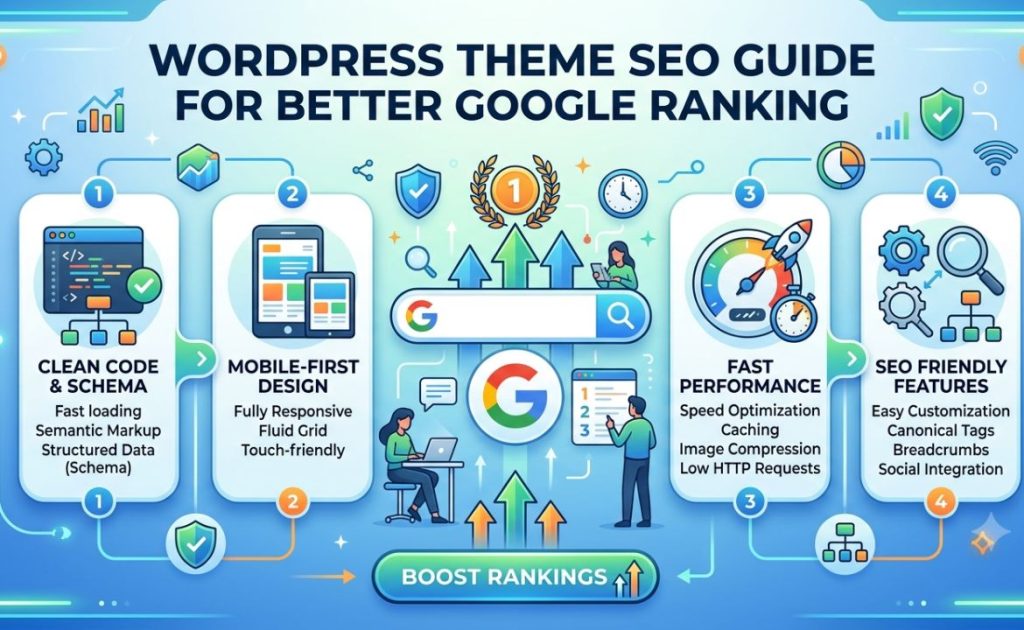
If you want your website to rank higher on Google, choosing the right theme and optimizing it properly is one of the most important steps you can take. WordPress theme SEO is not just about picking a pretty design — it’s about ensuring your theme is built in a way that search engines can crawl, understand, and reward. This guide walks you through everything you need to know to make your WordPress theme work hard for your Google rankings.
Why Your WordPress Theme Affects SEO
Many website owners focus entirely on content and backlinks when thinking about SEO, but the foundation of your site — its theme — plays a critical role in how well you rank. A poorly coded theme can slow down your site, produce messy HTML, block search engine crawlers, or create duplicate content issues that quietly sabotage all your other SEO efforts.
Google’s ranking algorithm evaluates hundreds of factors, and many of them — page speed, mobile-friendliness, Core Web Vitals, structured data support — are directly influenced by the theme you choose and how it’s configured. Getting your WordPress theme SEO right from the start saves you from expensive technical problems down the road.
1. Choose an SEO-Friendly Theme
Not all WordPress themes are created equal. When evaluating a theme for SEO performance, look for the following qualities:
Clean, Semantic HTML: A well-coded theme uses proper HTML5 semantic elements — <header>, <main>, <article>, <section>, <footer> — which help search engines understand the structure and hierarchy of your content. Themes that rely on excessive <div> nesting without semantic meaning are harder for crawlers to parse effectively.
Lightweight Codebase: Heavy themes loaded with unnecessary features, bloated JavaScript, and unused CSS slow your site down. Page speed is a confirmed Google ranking factor, and the Core Web Vitals — Largest Contentful Paint (LCP), Cumulative Layout Shift (CLS), and Interaction to Next Paint (INP) — are directly tied to how efficiently your theme delivers content. Themes like Astra, GeneratePress, and Kadence are popular precisely because they prioritize performance.
Schema Markup Support: Themes that include built-in schema markup (structured data) help Google display rich results like star ratings, FAQs, and breadcrumbs in search listings. Rich results can dramatically improve your click-through rates even if your position doesn’t change.
Active Development and Updates: A theme that is regularly maintained means security patches and compatibility with the latest WordPress and PHP versions. Outdated themes can introduce vulnerabilities and compatibility issues that hurt both security and SEO.
2. Optimize Page Speed Through Your Theme
Page speed is one of the most actionable aspects of WordPress theme SEO. A slow website not only frustrates visitors but is penalized by Google in search rankings. Here’s how to speed things up at the theme level:
Minimize HTTP Requests: Every script, stylesheet, and font file your theme loads is a separate HTTP request. Themes that combine CSS files, defer non-critical JavaScript, and load only what’s needed on each page will load faster.
Use System Fonts or Optimize Web Fonts: Custom web fonts (like Google Fonts) add loading time. If your theme loads multiple font families and weights, consider limiting them. Some themes allow you to switch to system fonts entirely, which eliminates font-related latency.
Avoid Render-Blocking Resources: CSS and JavaScript that block the browser from rendering the page increase your Time to First Byte (TTFB) and LCP scores. Choose themes that defer or asynchronously load scripts wherever possible.
Enable Lazy Loading: Images account for a significant portion of page weight. Modern SEO-friendly themes include lazy loading for images by default, meaning images only load as users scroll toward them rather than all at once.
You can test your theme’s performance using Google PageSpeed Insights or GTmetrix, both of which provide actionable recommendations tied to Core Web Vitals.
3. Ensure Full Mobile Responsiveness
Google uses mobile-first indexing, which means it primarily uses the mobile version of your content for indexing and ranking. This makes your theme’s responsive design non-negotiable for wordpress theme seo.
A truly mobile-responsive theme adjusts its layout fluidly across all screen sizes — smartphones, tablets, and desktops — without sacrificing readability or functionality. Beyond basic responsiveness, check that:
- Tap targets (buttons and links) are large enough to be easily tapped on small screens
- Text is legible without the need to zoom
- Content doesn’t overflow or get clipped on narrow viewports
- No intrusive pop-ups obscure content on mobile (a Google penalty trigger)
Use Google’s Mobile-Friendly Test tool to confirm your theme passes these criteria.
4. Optimize Your Theme’s Header and Title Tag Structure
The way your theme outputs title tags and heading structures has a direct impact on how search engines interpret your pages.
Title Tags: Ensure your theme does not hardcode title tags in a way that conflicts with your SEO plugin (like Yoast SEO or Rank Math). Modern themes declare add_theme_support('title-tag') in their functions.php, delegating title tag control to WordPress and your SEO plugin. If your theme manages its own title tags, you may end up with duplicate or malformed titles.
Heading Hierarchy: Every page should have exactly one <h1> tag — typically the page or post title — followed by logical <h2> and <h3> subheadings. Some themes apply <h1> tags to site names or widget titles on every page, which creates duplicate H1s and confuses crawlers. Audit your theme’s heading structure using a browser inspector or an SEO auditing tool.
5. Use Breadcrumbs for Navigation and SEO
Breadcrumbs improve both user experience and SEO by helping visitors and search engines understand the hierarchical structure of your site. Many SEO-friendly themes include breadcrumb functionality built in, or at minimum provide hooks for breadcrumb plugins to insert them cleanly.
Breadcrumbs also enable the breadcrumb rich result in Google Search, giving your listings a visual path (e.g., Home > Blog > Category > Post Title) that can improve click-through rates.
6. Check for Canonical Tag and Open Graph Support
Duplicate content is a silent SEO killer. Your theme should not generate pages with duplicate URLs that compete against each other. While this is largely managed by your SEO plugin, themes that inject custom URL parameters or generate unnecessary archive pages can create problems.
Additionally, Open Graph meta tags — used by social platforms like Facebook and LinkedIn to display link previews — should be supported either through the theme or your SEO plugin. Themes that interfere with or override Open Graph tags can cause broken social previews and reduce traffic from social sharing.
7. Test and Audit Your Theme Regularly
Optimizing WordPress theme SEO is not a one-time task. After activating or updating a theme, run a full SEO audit using tools like:
- Google Search Console — monitors indexing issues, Core Web Vitals, and mobile usability
- Screaming Frog — crawls your site to uncover broken links, missing meta tags, and duplicate content
- Ahrefs or SEMrush — provides site health scores and tracks technical SEO issues over time
- PageSpeed Insights — measures Core Web Vitals and provides theme-level performance recommendations
Regular audits ensure that theme updates or new plugins haven’t introduced regressions that quietly drag down your rankings.
8. Pair Your Theme With a Reliable SEO Plugin
Even the best theme benefits from pairing with a dedicated SEO plugin. Plugins like Yoast SEO, Rank Math, or All in One SEO extend your theme’s capabilities with XML sitemaps, meta tag management, schema markup generators, and readability analysis. The theme handles structure and performance; the SEO plugin handles the metadata layer.
Final Thoughts
Getting wordpress theme seo right is one of the highest-leverage investments you can make for your website’s long-term Google ranking performance. A well-chosen, properly configured theme provides the technical foundation that all your content and link-building efforts rely on. Start with a lightweight, semantically coded, mobile-responsive theme, audit it for speed and structure, and pair it with a solid SEO plugin. With these foundations in place, every piece of content you publish has a much stronger chance of reaching the top of the search results where it belongs.
READ ALSO: SearchEngineLand Guide: Latest SEO News & Insights